Leave Your Message

What Is a Corner Computer Desk?

Remote work has made home workstations a practical concern, not merely a style choice. The U.S. Bureau of Labor Statistics’ 2023 American Time Use Survey found that 35% of employed people did some work at home on days they worked. That figure describes work location, not desk preference or productivity. Still, it helps explain why compact, well-planned work areas matter.

A Corner Computer Desk is a desk designed to fit into a room corner, often with an L-shaped work surface. One side can hold a monitor and keyboard; the other can keep notebooks, a lamp, or a printer within reach. In a small room, that arrangement may free up floor space. Small detail, real impact. But a corner shape alone does not make a setup comfortable.

OSHA’s Computer Workstations eTool offers practical guidance for arranging a workstation to support comfortable posture. Apply that advice by checking monitor height, keyboard position, legroom, and lighting before choosing a desk. Measure both walls, including space for chair movement and drawers. A tight fit can look neat in a product photo and feel awkward after an hour. Research on working at home does not prove that corner desks improve comfort or performance. The right choice depends on the room, the equipment, and the person using it. That part deserves a real measurement, not a guess.
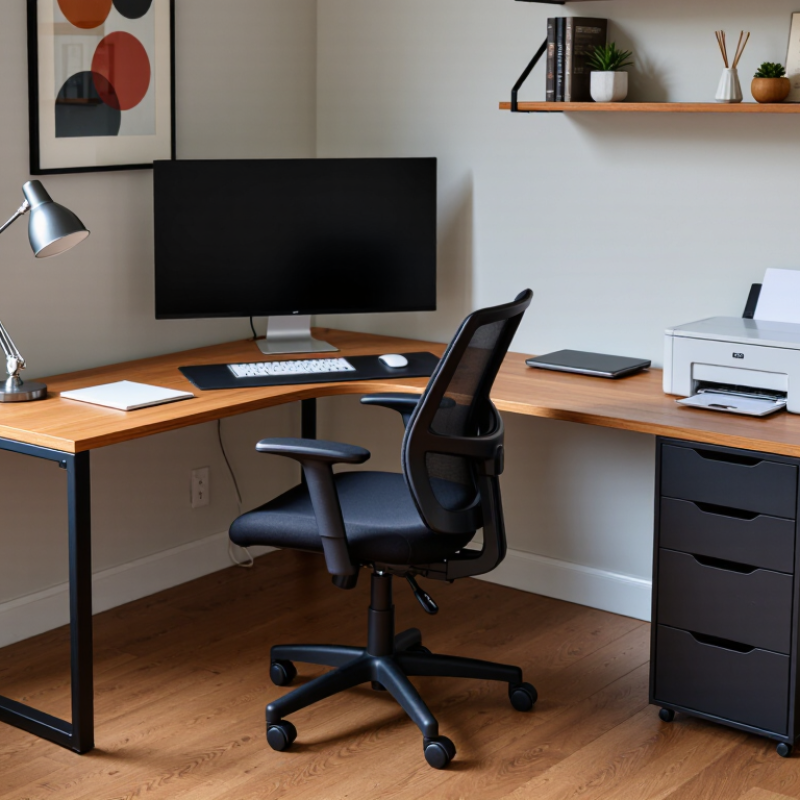
What Is a Corner Computer Desk?

Definition and L-Shaped Geometry: How a Corner Desk Fits a Room

A corner computer desk is a workstation designed to occupy the meeting point of two walls. Its L-shaped geometry usually gives it two connected work surfaces, often set at roughly a right angle. One side can hold a monitor and keyboard, while the other provides space for writing, a printer, or a lamp. The shape uses room depth rather than extending far into the center. That can leave more open floor around the chair.

Fit depends on more than the desk’s listed width. Measure both walls, then check the desk’s full depth and the space needed to pull out a chair. Keep door swings, drawers, radiators, and electrical outlets in view. A few inches matter. In a small room, a deep return can make the corner feel cramped, even when the desk technically fits. A corner can look perfect on paper. Real rooms have awkward trim, uneven walls, and cables that need somewhere to go. The L shape also places work within easy reach, but it may encourage clutter across both surfaces. Choose the orientation that keeps the main screen directly ahead and leaves a clear path through the room.

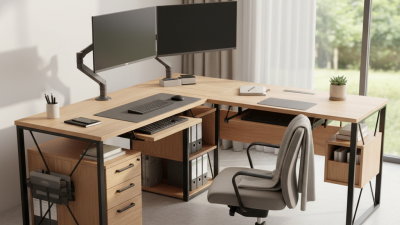
Main Components: Work Surface, Return, Frame, Storage, and Cable Management

A corner computer desk brings two work surfaces together, usually in an L shape. The main work surface holds the monitor, keyboard, and daily tools. Measure it against your actual equipment, not just the room corner. The return provides space for a printer, notebook, or second screen. Its position matters: a return that blocks a doorway or forces an awkward reach can make the desk less useful. A corner shape is not automatically ergonomic. That matters.

The frame supports both surfaces and affects how steady the desk feels. Check that its legs leave enough room for your chair and knees. Crossbars can improve stability, but may obstruct foot space. Storage might include drawers, shelves, or a small cabinet beneath the return. Keep frequently used items within easy reach, and reserve deeper storage for things you rarely need. Small, but useful. Too much weight on one side may make some desks feel unbalanced, so follow the maker’s load guidance.

Cable management keeps cords from tangling around chair legs. Look for modest features, such as a rear grommet, clips, or an under-desk tray. Leave enough slack for moving a monitor or adjusting the chair; tightly pulled cables can disconnect. Before buying, compare the desk’s measurements with the corner, baseboards, outlets, and nearby doors. Measurements are easy to overlook. A quick floor plan can reveal a poor fit before assembly.

Monitor Placement: OSHA’s Recommended 20–40-Inch Viewing Distance

A corner computer desk can save floor space, but its angled shape may push a monitor farther away than expected. OSHA workstation guidance gives a viewing distance of about 20 to 40 inches, measured from your eyes to the screen. Treat this as a useful range, not a rigid rule: screen size, eyesight, and text size affect what feels clear. A tape measure can help. Sit back in your usual chair, then check the distance to the center of the display.

On a corner desk, place the monitor directly in front of you rather than deep in one side of the corner. Keep the screen roughly an arm’s length away, with the top at or slightly below eye level. If you lean forward to read, enlarge the text or move the screen closer while staying within a comfortable range. Small changes matter. A keyboard pushed toward the front edge can also leave room for your wrists and keep your shoulders relaxed. The perfect position may not look perfectly centered on the desk. That can feel odd at first. Recheck it after a full work session; a setup that seems fine for five minutes may still strain your neck or eyes later.

Ergonomic Setup: OSHA Guidance on Neutral Wrists and Supported Forearms

A corner computer desk can place a monitor, keyboard, and mouse within easy reach, but its shape does not guarantee an ergonomic setup. OSHA’s computer workstation guidance recommends keeping wrists straight while typing and using a posture that avoids awkward reaches. Let your forearms rest comfortably, with shoulders relaxed and elbows near your sides. No sharp bends. Your hands should continue the line of your forearms, rather than angling upward or sideways.

Adjust your chair and keyboard position so your forearms feel supported without pressing hard against a desk edge. A folded towel can help you test a more comfortable height before changing the setup. Keep the mouse close to the keyboard; reaching around a monitor stand can quietly twist your wrist. Check your posture during ordinary work, not just when you sit down. A setup that feels fine for five minutes may become uncomfortable later. Bodies differ, and no single desk arrangement suits everyone, so make small adjustments and notice what changes. I still catch myself reaching for a mouse that has drifted too far away.

Accessible Clearance: ADA Minimums of 27-Inch Knee Height and 30-Inch Width

A corner computer desk can save floor space, but its angled shape must not compromise seated access. For an accessible work surface, plan for at least 27 inches of clear knee height and 30 inches of clear width. These measurements describe open space, not the desk’s overall dimensions.

Measure from the finished floor to the lowest obstruction beneath the surface. A deep apron, drawer, or support bar can reduce clearance, even when the desktop looks spacious. Keep the 30-inch-wide area free of legs and storage. Small detail. Big difference. A chair should roll into the opening without catching, and a user should be able to approach the work surface comfortably.

Corner desks vary, so check the actual space beneath the chosen section rather than relying on a product’s overall width. A tape measure helps; so does testing the chair position before fixing the layout. The 27-inch and 30-inch minimums are useful starting points, but they do not establish full accessibility by themselves. Reach, knee depth, toe space, and the specific installation also matter. I would not assume a desk is accessible just because it meets two measurements. Verify the applicable requirements for the setting, and allow extra room where possible.