Leave Your Message

Top L Shaped Computer Tables for Home and Office?

Choosing the right L Shaped Computer Table can change how a room feels and how efficiently you work. A well-designed corner desk can hold two monitors, a keyboard, paperwork, and a small lamp without consuming the entire floor. It can also separate focused work from household distractions. Not every model performs equally well.

This guide examines top L-shaped computer tables for home and office use through practical, experience-based details. We consider desktop size, frame stability, cable management, storage, legroom, and assembly quality. A 48-inch wall may suit a compact desk, while wider rooms can support a 60-inch or larger workspace. Measure carefully. Small errors matter.

We also look at monitor height, sitting posture, and the space beneath the return section. A desk may appear spacious but leave little room for your knees. Some shelves look useful yet block natural movement. Others wobble when a printer starts running. That is frustrating.

The recommendations balance professional design principles with everyday usability. They may help remote workers, students, gamers, and small-business owners compare realistic options. However, no single table fits every room or working style. My own preferences can also influence the evaluation, especially around storage and cable access. That deserves honest reflection.

Expect clear comparisons, practical limitations, and details you can verify before purchasing. Check dimensions twice. Your back will notice.
Top L Shaped Computer Tables for Home and Office?

What Is an L-Shaped Computer Table?

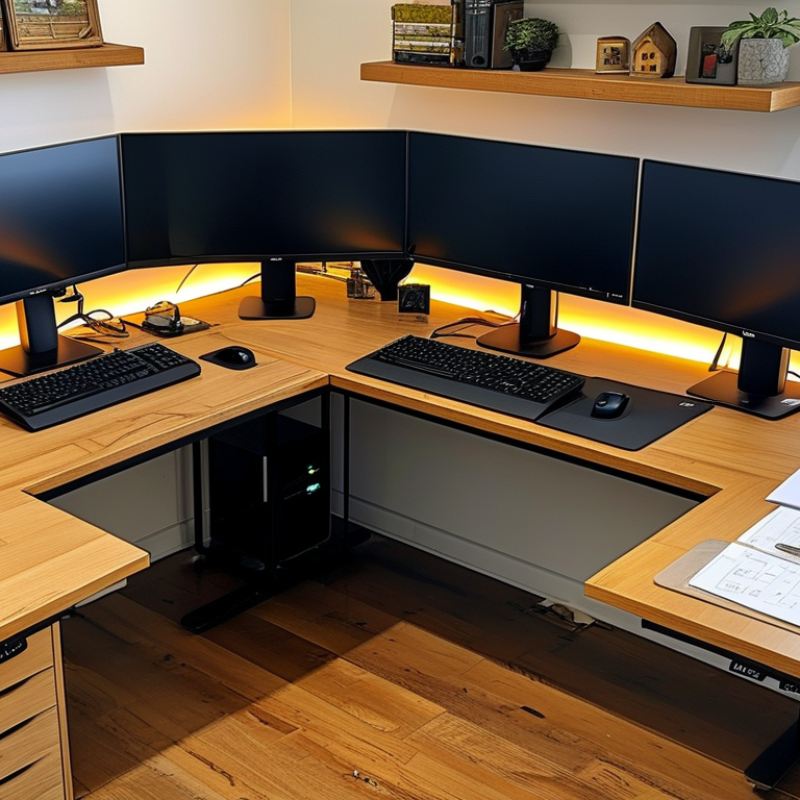
An L-shaped computer table is a desk with two connected surfaces meeting at a right angle. This design creates a corner workspace rather than one long, straight line. One side usually holds a monitor, keyboard, and mouse. The other side supports paperwork, a laptop, speakers, or storage.

Its main advantage is separation. You can keep digital work on one surface and writing materials on the other. The corner also places equipment within easy reach, which can reduce unnecessary movement during long tasks. In my experience, a desk depth of at least 55 centimeters feels more comfortable for a monitor. Leave enough legroom under both sections. A strong frame matters, especially when several devices share the tabletop.

An L-shaped table can suit home offices, study rooms, and shared work areas. It is not perfect for every room. A small corner may feel crowded once a chair, drawers, and cables are added. Measure twice. Check the wall length, outlet position, and door swing before buying. Cable openings help, but they do not solve every wiring problem. I have found that adjustable monitor height and a clear walking path often matter more than extra surface area. Choose a reversible layout if the room may change later.
Key Features to Compare Before Choosing a Table

An L-shaped computer table can turn an unused corner into a practical work zone. Before choosing, measure the room, doorway, and wall clearance carefully. Leave enough space for your chair to move without hitting cabinets or skirting boards. I once underestimated this clearance. The table looked perfect online but made the corner feel cramped.

Compare the desktop depth, not only its total length. A depth of 24 to 30 inches usually gives a monitor, keyboard, and writing space room to breathe. Check the table height against your chair and elbow position. Your forearms should rest comfortably while typing. Adjustable feet can reduce wobbling on uneven floors. A strong frame matters, especially with two monitors, speakers, and books. Check the stated weight capacity rather than trusting appearance.

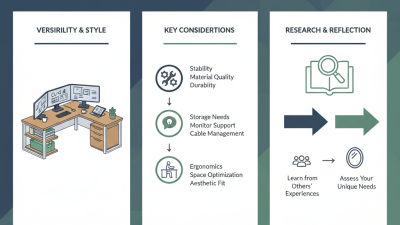
Cable management also deserves close attention. Look for rear openings, under-desk trays, and enough space for power adapters. Storage should match your habits, since drawers can reduce legroom. Consider whether the corner orientation can be reversed. That feature helps when a room layout changes later. Inspect the surface finish for scratch resistance and easy cleaning. Assembly instructions should be clear, with labeled parts and reliable fasteners. Some tables feel sturdy after assembly but loosen after weeks of movement. Read user feedback carefully, but remember that reviews can reflect different flooring, equipment, and expectations. No table wins every test. That is worth admitting.

Best L-Shaped Table Types for Home and Office Use

Top L Shaped Computer Tables for Home and Office

The best L-shaped table type depends on your room, equipment, and working habits. A corner executive table suits large offices with two monitors, documents, and storage. Its deep surface feels stable, but it can dominate a small room. A compact reversible table works better in apartments. You can place the return on either side, although lightweight frames may wobble during intensive typing.

The U.S. Bureau of Labor Statistics reported that 22.5% of employed people worked at home on days worked in 2023. This makes practical home-office furniture increasingly important. For mixed work and gaming, choose a modular L-shaped table with cable openings and adjustable shelving. For long computer sessions, a sit-stand L-shaped table offers posture changes. OSHA advises keeping the monitor near eye level and the keyboard at a comfortable height. Measure carefully.

A reliable setup leaves at least 90 centimeters behind the chair. That space allows safer movement and easier cleaning. Look for a worktop at least 60 centimeters deep for a monitor and keyboard. Two separate surfaces can also reduce clutter. In my experience, corner storage often becomes a dumping zone. It needs discipline. Rounded edges, strong leg support, and a level-adjustment system matter more than decorative finishes. Data from the 2024 Global Workplace Survey by Gensler also highlights the value of choice and control in work environments, supporting flexible desk layouts.

How to Match Table Size, Materials, and Storage Needs

Top L Shaped Computer Tables for Home and Office?

An L-shaped computer table works best when its size matches the room, chair, and daily movement. Measure the available wall space before choosing a model. Leave at least 36 inches behind the chair for comfortable movement. Each desktop wing should provide enough depth for your monitor, keyboard, and writing area. A depth near 24 inches often feels practical. Smaller rooms may need a narrower surface.

Materials affect stability, comfort, and maintenance. Solid wood offers a warm appearance and strong weight support, but it can be heavy and sensitive to humidity. Steel frames usually improve rigidity, especially for large monitors. Engineered panels can reduce cost, though thin panels may sag over time. Check the frame joints and leveling feet. I once chose a wide table with weak corner support. It looked impressive, but the surface shook during typing.

Storage should follow your real work habits. Drawers can hold cables, notebooks, and chargers. Open shelves provide quick access but collect dust. A raised monitor shelf may free desk space, yet it can reduce visual comfort if positioned too high. Keep frequently used items within easy reach. Store rarely used equipment farther away. Measure your computer tower, printer, and power strip before buying. Specifications are useful, but they sometimes omit the usable space around supports and drawers.

Top L Shaped Computer Tables for Home and Office? - How to Match Table Size, Materials, and Storage Needs

Table Configuration Typical Overall Size
(W × D × H)
Recommended Worktop Area Common Materials Storage Features Best For Room-Fit Guidance
Compact Corner L-Desk 47–55 × 47–55 × 29–30 in
(119–140 × 119–140 × 74–76 cm)
One monitor, laptop, keyboard, and small accessories Engineered wood or laminated particleboard; powder-coated steel frame Open shelves, a monitor riser, or a small under-desk drawer Small bedrooms, apartments, and occasional home-office work Allow at least 30 in (76 cm) of chair clearance in front of the main working edge.
Standard Two-Monitor L-Desk 60–66 × 60–66 × 29–30 in
(152–168 × 152–168 × 74–76 cm)
Two monitors, computer tower, keyboard, documents, and desk accessories Laminated MDF or particleboard with a steel or reinforced composite frame Cable-management opening, keyboard tray, and one or two drawers General home offices, students, and everyday computer work A practical choice when two perpendicular work zones are needed without using a full room wall.
Large Executive L-Desk 70–78 × 70–78 × 29–30 in
(178–198 × 178–198 × 74–76 cm)
Multiple monitors, printer, paperwork, and a dedicated writing area Thick engineered-wood panels, laminate finish, and metal support structure File drawer, storage cabinet, open shelving, and built-in wire management Large home offices, managers, freelancers, and document-heavy work Measure doorways and wall lengths first; leave roughly 36 in (91 cm) for comfortable movement.
Reversible L-Desk 55–63 × 55–63 × 29–30 in
(140–160 × 140–160 × 74–76 cm)
One long main surface plus a shorter return for a monitor or documents Laminated engineered wood with steel legs or a combination of steel and wood-based panels Movable shelves, open cubbies, and optional drawer units Renters, shared rooms, and layouts that may change over time Choose a reversible return when the desk must work in either a left-hand or right-hand corner.
Gaming L-Desk 55–63 × 55–63 × 29–31 in
(140–160 × 140–160 × 74–79 cm)
Two or three monitors, gaming keyboard, speakers, and accessories Laminated MDF or particleboard with a steel frame and scratch-resistant surface Headset hook, cable tray, raised monitor shelf, and controller storage Gaming rooms, streaming setups, and multi-screen entertainment areas Check the return depth carefully so monitors and accessories do not restrict legroom.
Solid-Wood L-Desk 60–72 × 60–72 × 29–30 in
(152–183 × 152–183 × 74–76 cm)
Large monitor setup, writing space, and long-term daily use Solid hardwood top with sealed or oiled finish; wood or steel base Usually fewer built-in compartments; pair with a mobile pedestal or bookcase Durability-focused offices and traditional interior styles Solid wood is heavier and can expand or contract with humidity, so allow a stable, dry location.
Standing or Height-Adjustable L-Desk 55–72 × 55–72 × 28–48 in
(140–183 × 140–183 × 71–122 cm)
One to three monitors with alternating seated and standing work positions Laminate or engineered-wood desktop with dual-motor steel lifting frame Cable basket, memory-height controls, and limited under-desk storage Ergonomic home offices and users who change posture during the day Keep cables slack throughout the height range and verify that drawers will not obstruct the lifting frame.

Dimensions are typical ranges for commonly available L-shaped computer tables. Always confirm the assembled measurements, weight capacity, return orientation, and clearance requirements before purchase.

Tips for Setting Up an Efficient L-Shaped Workspace

An efficient L-shaped workspace begins with clear zones. Place your primary monitor directly in front of your chair. Keep the second surface for writing, charging, or occasional tasks. This simple arrangement reduces repeated turning and keeps daily work within reach.

Measure the corner before choosing a table. Leave at least a small gap from walls for cable access and airflow. Set the desktop near elbow height, with your forearms resting comfortably. A monitor stand can raise the screen and free valuable surface space. Keep frequently used items close, while storing rarely used supplies in drawers or bins.

Light matters more than many buyers expect. Position the desk beside a window, not directly facing it, to limit screen glare. Add a soft desk lamp for cloudy afternoons. Route cables along the rear edge, but avoid forcing them into tight bends. Keep power connections visible and reachable.

Test the setup for several work sessions. It may look organized yet feel awkward. My own mistake was placing the printer in the far corner, creating constant interruptions. Leave enough legroom beneath both sides, especially if you change positions often. A small wastebasket, notebook, and water glass can prevent unnecessary trips. Keep one surface deliberately open.

L-Shaped Workspace Setup: Practical Dimension Targets

These representative planning targets help compare L-shaped computer tables for home and office use. A 60-inch main surface and 48-inch return provide room for a monitor, keyboard, documents, and secondary equipment, while a 30-inch depth supports comfortable screen and keyboard placement. The 30-inch monitor distance is within the commonly recommended 20–40 inch viewing range. Confirm the exact measurements, legroom, and chair clearance before purchasing.